What the system does · chapter 12 of 27 · 16 minutes
12 The connection to a data network
What a PDU session is, the five kinds it can be, how long an address lives, and how the network keeps, moves or drops the session as you walk.
Built from §5.6
12.1 Why the system needs a container for connectivity
A phone that is registered on a 5G network can be found and paged, but it cannot send a packet anywhere.
Registration says who you are and roughly where you are; it does not say which network you want to reach, what kind of traffic you will send, who is paying, or what should happen to your address when you walk into the next city.
All of that has to hang off something, and that something is the PDU session. The core offers a PDU Connectivity Service, which is the exchange of protocol data units between a device and one data network named by a DNN — a Data Network Name §5.6.1.
One session is one device, one data network, one kind of packet, one continuity promise.
A device may hold several at once, to the same data network or to different ones, over the mobile network and over Wi-Fi at the same time, and they may be run by different SMFs — the functions that manage sessions §5.6.1.
12.2 What is fixed and what may move
The device asks for a session over NAS session-management signalling (NAS is the conversation between a device and the core, which the radio only carries). It travels over N1 (the signalling path between the device and the core).
The AMF (the function that tracks where a device is) is the only place N1 terminates, so it routes each message to the right SMF by the PDU Session ID in it. Once an SMF is chosen, every later message for that session goes to the same one §5.6.2.
The device supplies the PDU Session ID, unique within that device. It is stored in the UDM so that a handover between mobile and non-mobile access still works when the two accesses sit in different networks §5.6.1.
Almost everything agreed at establishment is then frozen. Table 5.6.1-1 marks which attributes may be modified later: the DNN, the session type, the SSC mode, the session ID, the user plane security enforcement and the multi-access flag are all "No".
The one that may change is the slice identifier of the serving network, because a device can carry a session into another PLMN (one operator's network in one country) §5.6.1.
The SMF checks the request against subscription data it fetches from the UDM, one set per DNN and per slice. That data names the allowed session types and the allowed SSC modes, and the default of each.
It also carries the subscribed Session-AMBR (the ceiling on the combined speed of the whole session), the default 5QI and allocation and retention priority, an IP index, a static address or prefix, the user plane security policy, and the charging characteristics §5.6.1.
12.3 The name picks the network
The DNN is the string that says which data network you get: the operator's internet service, an IMS network (the operator's own system for calls and messages carried over IP), a factory floor.
If the device names one, the AMF uses it to find an SMF through the NRF — unless the AMF already has the SMF configured locally, in which case it need not ask §6.3.2.
If it names none, the AMF takes the default DNN for that slice from the subscription, or a locally configured one if there is no default §5.6.1.
If the named DNN is not supported and no SMF can be found, the request is rejected with a cause saying so — unless the PCF has given the AMF a policy to replace it.
DNN replacement also covers the opposite case, where a valid device-requested name is swapped for one used only inside the network. Both the requested and the selected name are then handed to the SMF §5.6.1.
A subscription may also carry a wildcard DNN for a slice, which lets the device use any name at all under that slice §5.6.1.
12.4 Five types, and what actually differs
Every session carries exactly one type, chosen at establishment: IPv4, IPv6, IPv4v6, Ethernet or Unstructured §5.6.1.
-
The IP types behave as you expect. The device may pick up P-CSCF addresses (the first call-handling box a phone talks to when it places a call over IP), DNS server addresses, DNS security information and its own GPSI from the SMF during the session's life §5.6.10.1.
-
Ethernet carries frames, and the core allocates neither a MAC address (the hardware address that names a device on a local network) nor an IP address for it. The device strips the preamble and frame check sequence before sending, and the anchor strips them on the way down §5.6.10.2.
-
Unstructured carries whatever the device sends, over a point-to-point tunnel on N6 (the link from the anchor out to the data network). There is at most one QoS Flow per Unstructured session §5.6.10.3.
Where that tunnel is the kind built on UDP and IPv6, the SMF allocates an IPv6 prefix and never tells the device about it: it is there so the anchor can tell one session's traffic from another's §5.6.10.3.
An Ethernet session's anchor stores the MAC addresses the device uses. It can answer ARP (the shout on a local network asking which machine holds a given IP address) and IPv6 Neighbour Solicitation from a local cache, rather than broadcasting the question to every device on the network.
The SMF may also be given a list of up to 16 allowed MAC addresses and up to 16 allowed VLAN tags, from the UDM or from the data network's AAA server (the machine that decides who is let into that network and what they may do).
Traffic outside the MAC list is discarded, and the UPF may be told to discard traffic outside the VLAN list §5.6.10.2.
Only the device is authenticated, never the machines behind it on the LAN §5.6.10.2. A range of addresses behind the device can still be made reachable over the one session — that is framed routing, for IP types only §5.6.14.
Packet size is settled per type. The IPv4 link MTU (the largest packet the link will carry) arrives in the protocol configuration options (the small bag of settings the network hands the device as the session starts), and the IPv6 one arrives in a Router Advertisement.
For Unstructured and Ethernet a maximum payload size may be signalled the same way, and an Unstructured session gets at least 128 octets in both directions §5.6.10.4.
12.5 Addresses, and how long they last
Handing out the address itself belongs to the user plane clauses — see §5.8.1 and Where the packets actually go. What clause §5.6 settles is how long it survives.
Three things pull on it. A static address or prefix in the subscription pins the session to SSC mode 1 §5.6.9.3. The data network's AAA server may supply the address instead, as part of authorising the session §5.6.6. And the SSC mode decides what happens on the day the anchor has to move.
12.6 Continuity: three modes, three promises
The SSC mode — session and service continuity — is the promise the network makes about the connection when the device moves. It is chosen at establishment and never changes §5.6.9.1.
| Mode | What the network does | Address | Who must support it |
|---|---|---|---|
| 1 | Keeps the anchor it picked, whatever access the device uses | Preserved, with one exception | Every device |
| 2 | May release the session and tell the device to build a new one at once | Released with the session | Optional |
| 3 | Builds the new anchor before dropping the old | Not preserved; old one kept a while | Optional |
The exception on mode 1: the address the device was given is preserved, but extra IPv6 prefixes from anchors added later are not, and the device is told not to expect them to last the session §5.6.9.2.1.
Mode 1 is the simple one. The anchor stays put whatever access technology the device moves through, and IP continuity holds through any mobility event §5.6.9.2.1. The cost is a packet path that gets longer the further you walk from where the session started.
Mode 2 is the disruptive one. When the operator's policy says so — a request from an application function, a loaded node — the network releases the session and instructs the device to establish a new one to the same data network immediately, picking a better anchor as it does.
The cost is a visible break, and a new address §5.6.9.2.2.
Mode 3 is the careful one. Connectivity through a new anchor is set up before the old one is torn down, so nothing is lost. The device is told, over NAS signalling or in a Router Advertisement, how long the old address stays valid, and then it goes §5.6.9.2.3.
Mode 3 only applies to IP types. Unstructured and Ethernet sessions are restricted to modes 1 and 2, and neither the device nor the network may ask for mode 3 on them §5.6.9.3.
Selection is the SMF's, from the allowed and default modes in the subscription, the session type, and whatever the device asked for. If the device asked for something not allowed, the SMF rejects with a cause and the list of modes it could have, so the device can try again §5.6.9.3.
12.7 One session, several exits
A session may reach the same data network through more than one anchor at once. This exists for two reasons: sending some traffic out close to the device, and supporting mode 3 §5.6.4.1.
12.7.1 The uplink classifier
The SMF may drop a UPF acting as an uplink classifier into the path. It matches uplink packets against filters and sends some to a nearby anchor and the rest to the far one, merging the downlink traffic back onto one link toward the device.
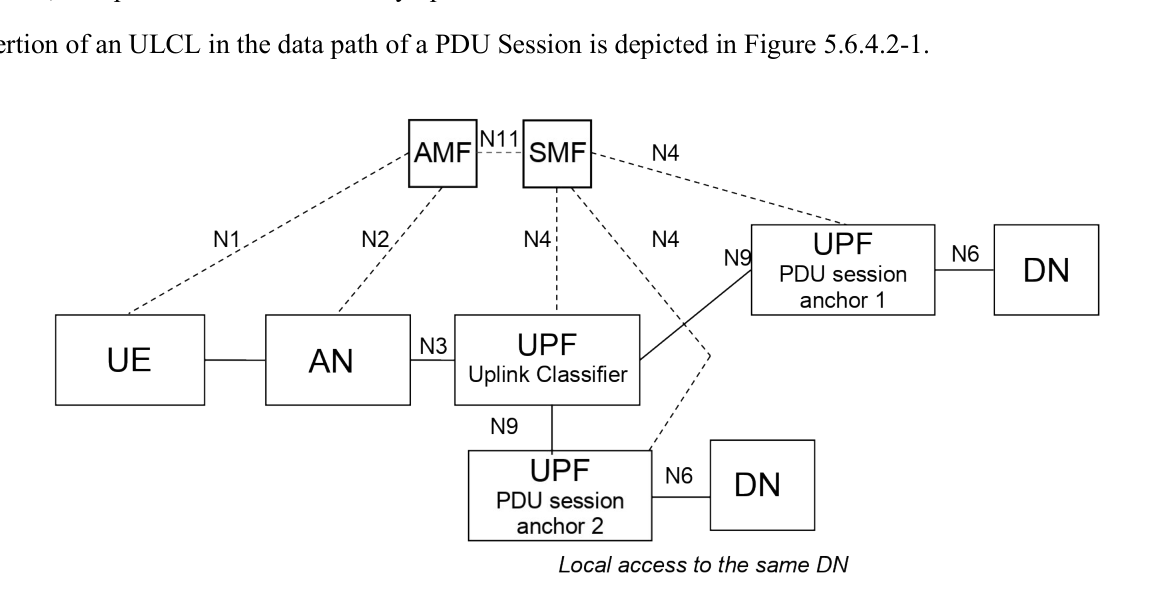
The device knows nothing about this. It still holds exactly one IPv4 address and/or one IPv6 prefix, and it takes no part in inserting or removing the classifier §5.6.4.2.
Only one classifier connects to the radio network over N3 (the tunnel between the radio side and the core's user plane), except while one is being relocated §5.6.4.2.
When the device moves far enough that the classifier itself must move, the network may build a temporary forwarding tunnel on N9 (the link between two of the core's own user-plane boxes) from the old classifier to the new one.
Sessions already talking to the old local server then keep working while new traffic goes to the new one. The tunnel lives until traffic on it stops for a configured period, or until the application function says the old anchor may go §5.6.4.2.
12.7.2 IPv6 multi-homing
The other shape gives the session several IPv6 prefixes. The paths branch at a UPF acting as a branching point, which spreads uplink traffic by the source prefix the device chose.
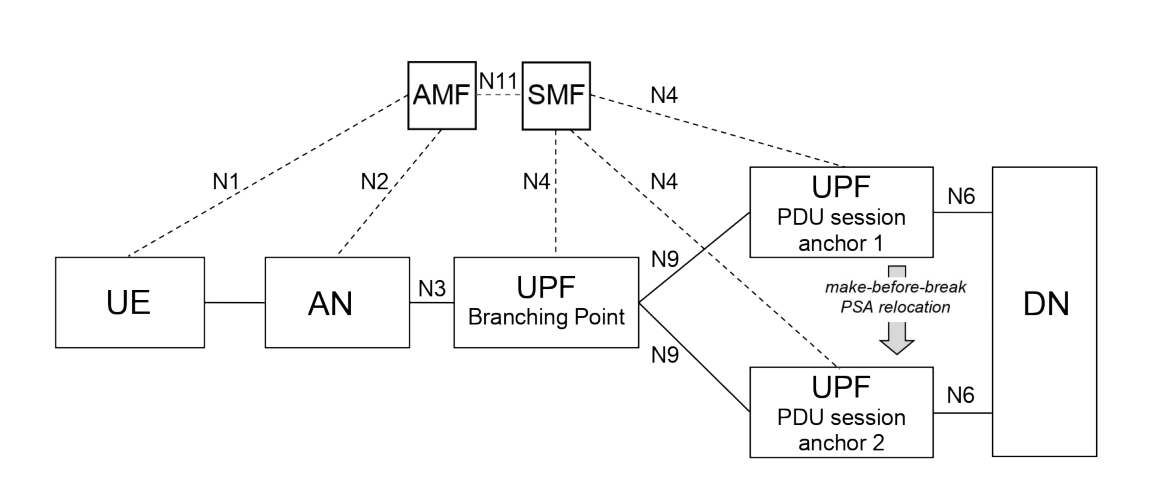
The device is involved here: it picks the source prefix, guided by routing information and preferences the network configures using IETF RFC 4191 §5.6.4.3. Multi-homing is IPv6 only, and when asking for an IPv6 or IPv4v6 session the device says whether it supports it.
Two situations use it. One is make-before-break for mode 3. The other is reaching a local service and a central service over the same session — the same data network, two exits §5.6.4.3.
Which anchors get chosen, and when, is the SMF's decision §5.6.4.1, and application functions can ask for traffic to be routed near a given place §5.6.7.1. That story belongs to Computing close by, and opening the door.
12.8 Data networks that only exist in one place
A local area data network is a DNN that only works inside a stated area — a set of tracking areas, configured in the AMF per data network. It applies to mobile access only, never to home-routed roaming, and needs an explicit or wildcard subscription to the DNN §5.6.5.
The device is told the area during registration, and what it is told is the intersection of the real service area with the registration area it was given, so it may be only part of the whole §5.6.5.
Out of the area the device must not ask for the user plane, must not send data in a NAS message and must not establish or modify a session for that DNN. It need not release an existing one unless told to §5.6.5.
The SMF sees the same fact from the other side. It subscribes to mobility notifications for the area §5.6.11 and is told IN, OUT or UNKNOWN. On OUT it either releases the session at once, or switches off the user plane and keeps the session, releasing it later if the device does not come back §5.6.5.
A variant scopes the area to a DNN and slice pair rather than a DNN alone §5.6.5a, which matters for the closed networks in Networks that are not for everybody.
12.9 Proving yourself to the data network as well
Getting onto the 5G core is one thing; being allowed into an enterprise network is another.
Secondary authentication is the second check, run by an AAA server in the data network during establishment, using EAP (a wrapper that can carry any kind of login exchange) over NAS session-management signalling §5.6.6.
It sits on top of the access authentication the AMF does (Who you are and who may listen) and the subscription check the SMF does against the UDM. If it fails, the session is not established §5.6.6.
When it succeeds, the AAA server may hand back authorisation data: a profile index, allowed MAC addresses and VLAN tags for Ethernet sessions, and a Session-AMBR that overrides the subscribed one from the UDM.
It may also return framed route information and L2TP tunnel details (an older way of carrying a link across somebody else's network) §5.6.6.
The link between SMF and AAA server stays open, so either side can re-authenticate later. The server can also revoke the authorisation, at which point the SMF updates or releases the session §5.6.6.
12.10 Kept, moved, switched off
The session and its user plane are separate things. Activating the user plane of a session means bringing up its data radio bearer and its N3 tunnel, and that happens per session: a device with four sessions can have one active and three dormant §5.6.8.
Either side can start it. The network may page a device that is idle, and the paging message may name the access the session belongs to, so the device can answer over the mobile network for a session that was last routed over Wi-Fi §5.6.8. The rest of that machinery is in Registration, reachability and paging.
Moving a whole session between mobile access and non-mobile access is a per-session decision made by the device, and the home network can send policies to guide it §5.6.1. A session that lives on both at once is the multi-access session of Using two accesses at once.
An always-on session opts out of the dormant state. Its user plane has to be activated on every transition from idle to connected, the device asks for that even with nothing to send, and the SMF should not switch it off for inactivity §5.6.8.
The device asks for the treatment on an indication from upper layers; the SMF decides whether to grant it §5.6.13.
12.11 Where this meets everything else
Quality lives inside the session as QoS Flows What the network promises, and the anchors and tunnels it rides on are Where the packets actually go. The rules that decide DNN replacement, SSC mode policy and traffic routing come from the PCF Rules, and paying for them, and the slice a session belongs to is One network, many networks.
Away from home the session is either broken out locally or routed home. Under local breakout the SMF and every UPF the session uses belong to the visited network, and no home SMF is in the session at all.
Under home routing the session-management signalling terminates in the visited SMF while the home SMF checks the subscription §5.6.3 — see Being served by somebody else's network.
Two smaller features also hang off the session and are worth knowing by name. Service function chaining steers traffic through operator functions such as NAT or parental control on the far side of the anchor §5.6.16.1.
Handling of payload headers lets an application function have headers detected, inserted, replaced or removed in the user plane §5.6.17.1.
Check yourself
Answers appear when you pick one, with where they come from.
Q12.1 Which attribute of a PDU session may change while the session is alive?
The serving network's slice identifier can change when the UE moves to a different PLMN while keeping the session. DNN, session type, SSC mode and session ID are all fixed for the lifetime of the session. §5.6.1
Q12.2 What happens to the IP address under SSC mode 3?
SSC mode 3 is make-before-break. The new anchor brings a new address or prefix, the old one is kept for a stated time, then released. §5.6.9.2.3
Q12.3 Which session types may be given SSC mode 3?
The specification says the UE shall not request and the network shall not assign SSC mode 3 for an Unstructured or an Ethernet session. §5.6.9.3
Q12.4 An uplink classifier has been inserted into an IPv4 session, so there are now two anchors. How many IPv4 addresses does the device hold?
The device is unaware of the traffic diversion and is not involved in inserting or removing the classifier. Only one address or prefix is given out. §5.6.4.2
Q12.5 A device carrying a local-area data network session walks out of the service area. What does the specification require of the device?
Out of area the device must not activate the user plane, send data or establish and modify the session — but it need not release an existing one unless the network asks. §5.6.5
Q12.6 What does marking a session always-on actually change?
An always-on session is one whose user plane has to come up on every idle-to-connected transition, and the device asks for it even with no pending uplink data. §5.6.13
This chapter was written against TS 23.501 version 20.2.0, verified 2026-08-04. A newer version of the document may say something else.